Tables
brg_account_to_account_tag
This bridge table allows the connection of accounts to account tags.
brg_date_type_to_transaction
This bridge table allows the connection of date types to transactions and dates
brg_school_to_school_tag
This bridge table allows the connection of school to school tags.
brg_staff_to_staff_tag
This bridge table allows the connection of staff to staff tags.
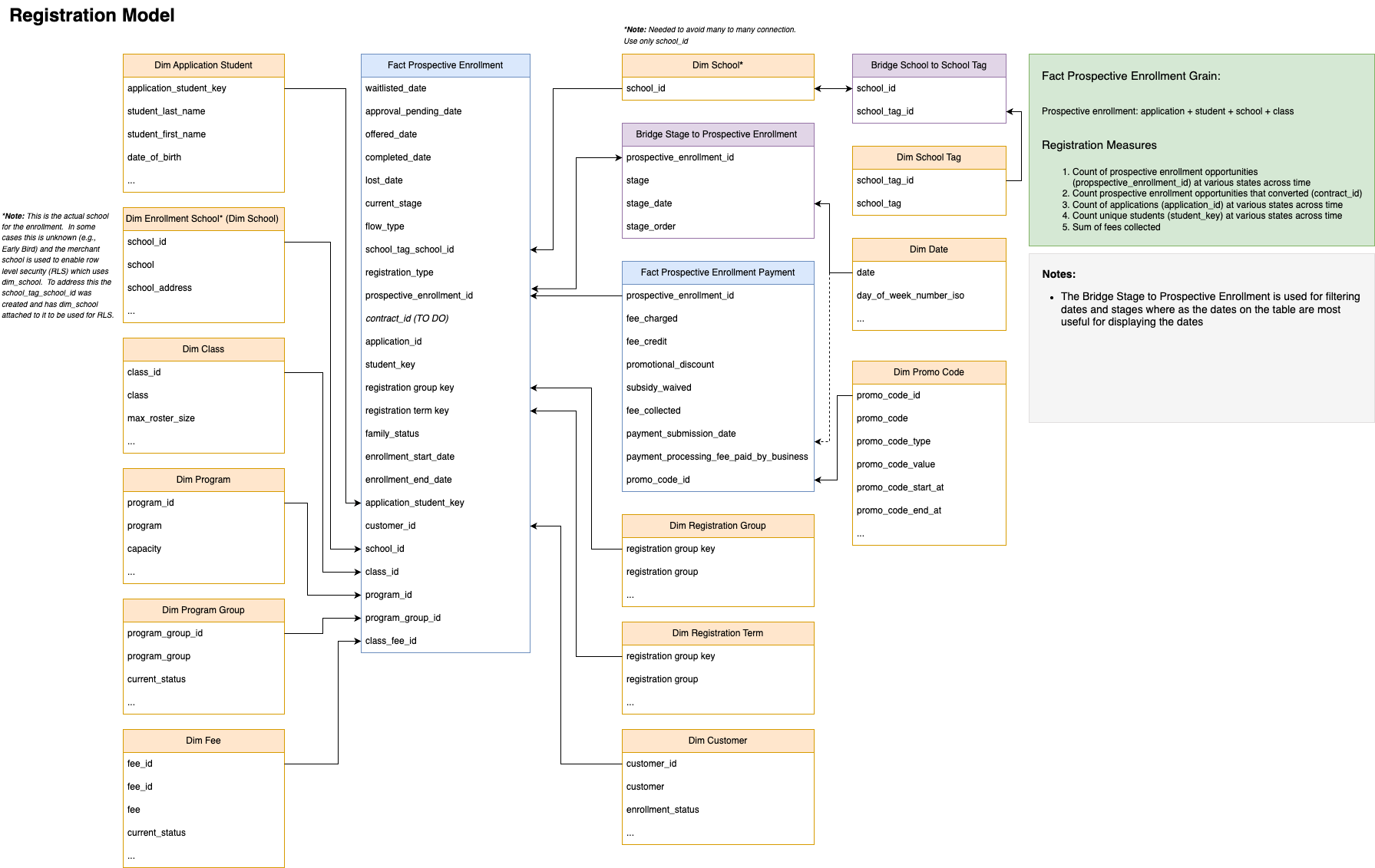
brg_stage_to_prospective_enrollment
This bridge table records the historical stages and corresponding dates for each prospective enrollment. When joined with fct_prospective_enrollment, it enables historical analysis of enrollment stages, including counts of stages such as 'Early Registration', 'In Progress', 'Applied', 'Approval Pending', 'Waitlisted', 'Completed', and 'Lost'.
brg_student_to_account
This bridge table allows the connection of students to accounts.
brg_student_to_student_tag
This bridge table allows the connection of students to student tags.
dim_account
Account information. The data grain is individual accounts within a school.
dim_account_contact
Account contact information. The data grain is contacts within accounts.
dim_account_tag
Account tags. The data grain is account tag level within a business.
dim_adjustment
Adjustment information. The data grain is individual adjustment at the business level.
dim_agency
Agency information. The data grain is individual child care subsidy agency.
dim_application_student
Application student information. The data grain is student within an application.
dim_business
Business information. The data grain is the business level information.
dim_business_unit
Business unit information. The data grain is the business unit level information within a business.
dim_class
Class information. The data grain is class level information within a school.
dim_customer
Customer information. The data grain is individual customers within a school.
dim_customer_contact
Customer contact information. The data grain is contacts within customer.
dim_date
Date dimension table
dim_fee
Fee information. The data grain is individual fee at the school/business scope (if business the fee can be applied to any school).
dim_gl_code
Information about general ledger (chart of accounts) codes. The data grain is GL codes at the business level.
dim_program
Information about programs. The data grain is program (a program may only have on associated class per center) at the business level.
dim_program_group
Information about program groups (used to group programs according to the fees being charged). The data grain is program group at the business level.
dim_promo_code
Information about registration fee promo discount codes. The data grain is promo codes at the business level.
dim_registration_group
A table that enables grouping (slicing) of registrations in meaningful ways. Because businesses have different registration flows (Program vs. IOE) or custom mappings that they've provided, this table provides groupings tailored to these differences.
dim_registration_term
A table that enables grouping (slicing) of registrations in meaningful ways. Because businesses have different registration flows (Program vs. IOE) or custom mappings that they've provided, this table provides groupings tailored to these differences.
dim_role
Role information which controls permissions. The data grain is at the role level within a business.
dim_royalty_setting
School level royalty settings
dim_school
School information. The data grain is school level information within a business.
dim_school_tag
School tags. The data grain is school tag level within a business.
dim_slicer_application_student
A deduped application student table for slicers; connects to dim_application_student.
dim_slicer_customer
A deduped customer table for slicers; connects to dim_customer.
dim_slicer_program
A deduped program table for slicers; connects to dim_program.
dim_staff
Staff information. The data grain is staff level within a business.
dim_staff_tag
Staff tags. The data grain is staff tag level within a business.
dim_student
Student information. The data grain is student.
dim_student_tag
Student tags. The data grain is student tag level within a business.
dim_time
Time dimension table
dim_transaction_group
Hierarchical categorizations applied to transactions to facilitate common data summaries like financial activity summaries, revenue reporting, and aged debt analysis. The three tiers consist of: category (top-level grouping like 'Charge', 'Credit', 'Subsidy'), subcategory (mid-level grouping such as 'Payment Completed', 'Payment Failed ACH Correction', 'Tuition Charge', 'Tuition Discount'), and detail (specific low-level information associated with the subcategory, such as payment method type or fee name). [{"Category":"Charge","Subcategory":"Tuition Charge","Detail":"Fee name","Subcategory Description":"Charges for tuition","Inclusion Criteria":"Transaction type marked as tuition AND NOT discount (System transaction named 'Discount' OR found in discount table) AND NOT early/late fee"},{"Category":"Charge","Subcategory":"Drop-In Charge","Detail":"Fee name","Subcategory Description":"Charges for drop-in care","Inclusion Criteria":"Transactions associated with sessions with source being 1 (parents) AND NOT discount AND NOT early/late fee"},{"Category":"Charge","Subcategory":"Registration Charge","Detail":"Description","Subcategory Description":"Charges for Registration","Inclusion Criteria":"Transaction type is system generated debit AND NOT tuition, discount, payment, OR subsidy estimate"},{"Category":"Charge","Subcategory":"Extended Attendance Charge","Detail":"Transaction type","Subcategory Description":"Additional fees for dropping off a child child early or picking up late; may be counted in tuition or other charges depending on the context","Inclusion Criteria":"System generated transaction type marked as early/late"},{"Category":"Charge","Subcategory":"Other Charge","Detail":"Transaction type","Subcategory Description":"Charges not for tuition, registration or extended attendance","Inclusion Criteria":"Transaction type is debit AND NOT tuition, discount, payment, OR subsidy estimate"},{"Category":"Subsidy","Subcategory":"Expected Subsidy Contribution","Detail":"Agency name","Subcategory Description":"A placeholder estimate of the amount of tuition that the agency will pay","Inclusion Criteria":"System generated found in subsidy payments table"},{"Category":"Deposit","Subcategory":"Deposit Applied","Detail":"Transaction type","Subcategory Description":"Deposit is applied to the balance (similar to a completed payment)","Inclusion Criteria":"Transaction type marked as deposit applied"},{"Category":"Deposit","Subcategory":"Deposit Received","Detail":"Transaction type","Subcategory Description":"Deposit is was held but not applied","Inclusion Criteria":"Transaction type marked as deposit received"},{"Category":"Deposit","Subcategory":"Deposit Held","Detail":"Transaction type","Subcategory Description":"A transaction to balance 'Deposit Received'","Inclusion Criteria":"Transaction type marked as deposit held"},{"Category":"Credit","Subcategory":"Account Credit","Detail":"Transaction type","Subcategory Description":"Credit that is not a discount","Inclusion Criteria":"Transaction type is NOT debit, tuition, discount, payment, OR subsidy estimate"},{"Category":"Credit","Subcategory":"Tuition Discount","Detail":"Discount name","Subcategory Description":"A discount for tuition","Inclusion Criteria":"Transaction type marked as tuition AND discount"},{"Category":"Credit","Subcategory":"Other Discount","Detail":"Discount name","Subcategory Description":"A general discount (rare)","Inclusion Criteria":"Discount but transaction type NOT marked as tuition"},{"Category":"Payment Applied","Subcategory":"Payment Completed","Detail":"Coalesce(Payment method, Transaction type)","Subcategory Description":"The payment went through and was applied to account","Inclusion Criteria":"In payments table WITH status of completed"},{"Category":"Payment Applied","Subcategory":"Payment Refunded","Detail":"Coalesce(Payment method, Transaction type)","Subcategory Description":"Payment was given back","Inclusion Criteria":"In payments table WITH status of refunded"},{"Category":"Payment Applied","Subcategory":"Payment Failed ACH Correction","Detail":"Coalesce(Payment method, Transaction type)","Subcategory Description":"The prior ACH completed but failed and now a balancing transaction is used to negate it","Inclusion Criteria":"In payments table WITH status of returned"},{"Category":"Payment Not Applied","Subcategory":"Payment Failed","Detail":"Coalesce(Payment method, Transaction type)","Subcategory Description":"Payment failed to go through","Inclusion Criteria":"In payments table WITH status of failed"},{"Category":"Payment Not Applied","Subcategory":"Payment Pending","Detail":"Coalesce(Payment method, Transaction type)","Subcategory Description":"Payment has not yet gone through","Inclusion Criteria":"In payments table WITH status of pending"},{"Category":"Payment Not Applied","Subcategory":"Payment Cancelled","Detail":"Coalesce(Payment method, Transaction type)","Subcategory Description":"Payment was cancelled prior to being completed","Inclusion Criteria":"In payments table WITH status of cancelled"},{"Category":"Payment Not Applied","Subcategory":"Payment Unsubmitted","Detail":"Coalesce(Payment method, Transaction type)","Subcategory Description":"Payment has not yet be submitted to the processor","Inclusion Criteria":"In payments table WITH status of unsubmitted"},{"Category":"Uncategorized Transaction","Subcategory":"Uncategorized Transaction","Detail":"Uncategorized transaction","Subcategory Description":"Typically won't happen. Likely a system bug at one time. Investigate.","Inclusion Criteria":"Does not meet one of the previous criteria"}]
dim_transaction_origin
Record origin information. The data grain is creator for individual transactions the entity creating the record. This can be either the system or an individual (staff, guardian, etc).
dim_transaction_type
Information about the type of transaction. Transaction types can be a system default type or user created. The data grain is transaction type at the business level.
fct_agency_payment
Agency payment info
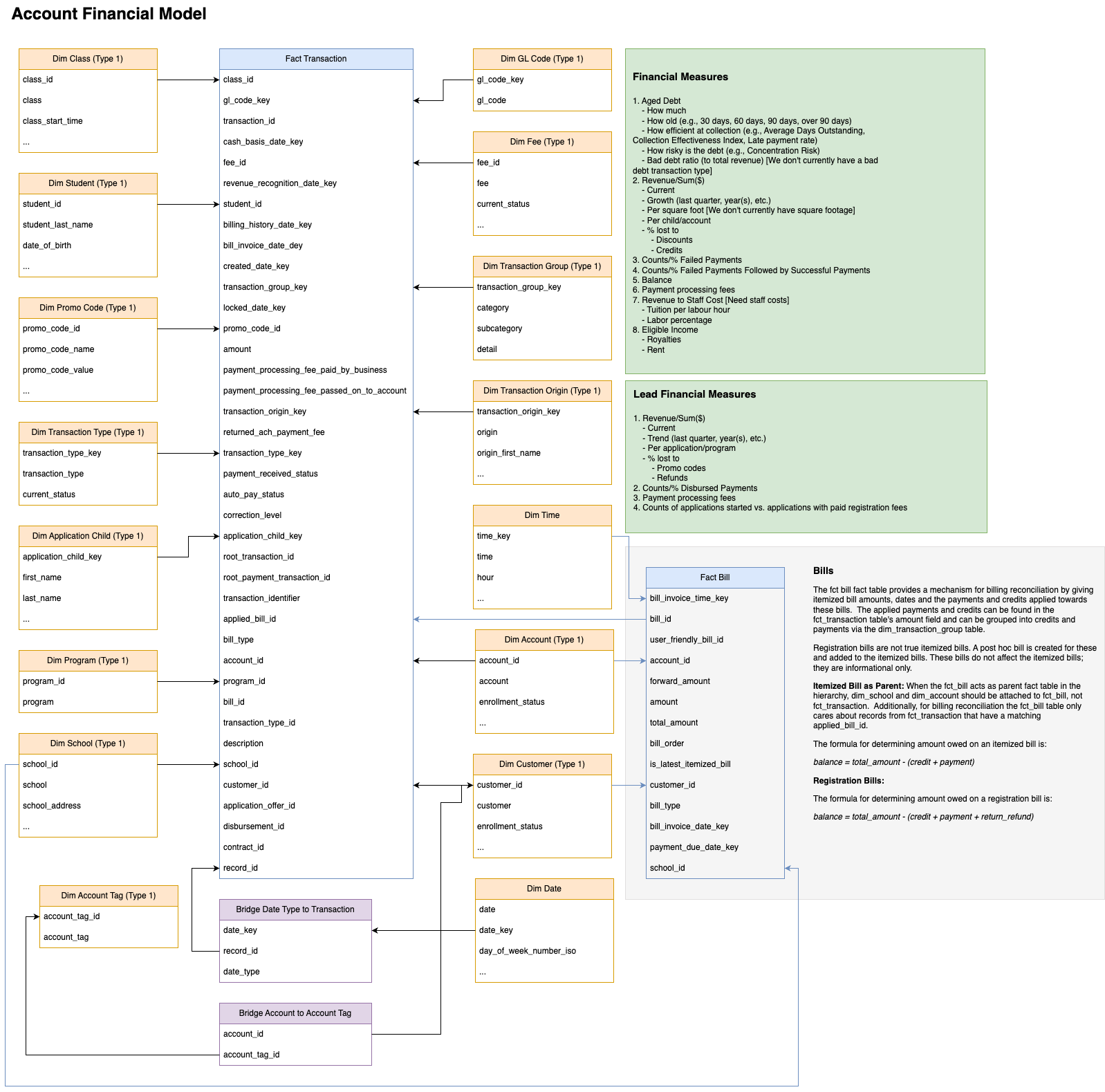
fct_bill
This fact table provides the amounts for bills (bills may include itemized and registration types). The grain of this fact table is at the itemized bill (account + bill for a given time). It can be combined with fct_transation to understand what payments and credits are intended to be applied toward the itemized bill. Credits in fct_transaction that are applied to an itemized bill can be connected their intended applied bill via the applied_bill_id in fct_transaction to bill_id in fct_bill. For itemized bill type, payments in fct_transaction can be assumed to be applied toward a particular itemized bill by matching the cash basis date key in fct_transaction that occur on or after the to the bill date on fct_bill but before the next itemized bill date. This fact table, coupled with accompanying fct_transaction and dimension tables, can help users to understand questions such as: How much of a bill is paid off before the due date or before the itemized bill occurs? How much money is still unpaid? What accounts are currently paid, unpaid, or partially paid? How much of an itemized bill has been disbursed?
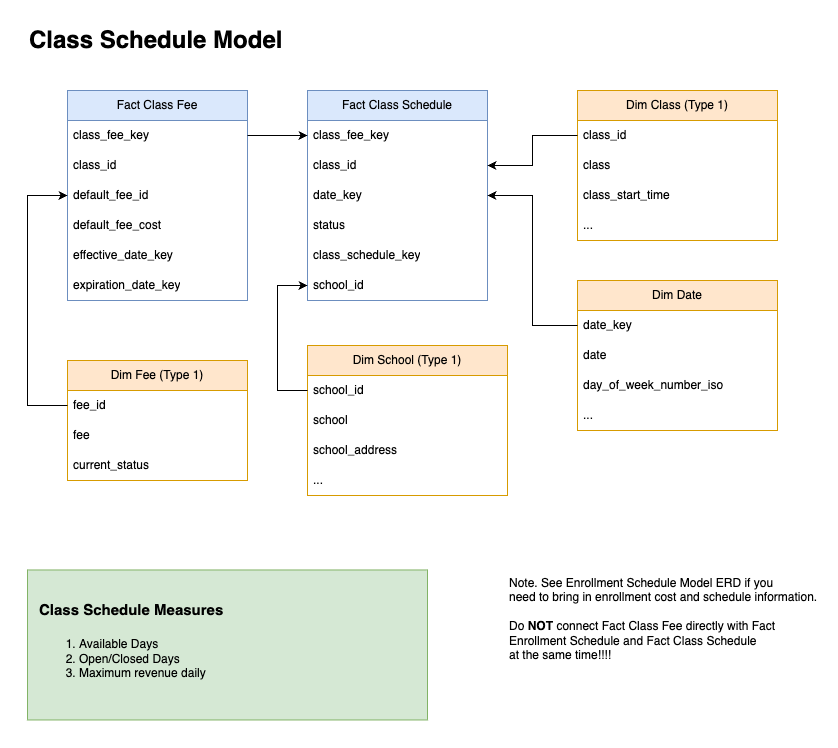
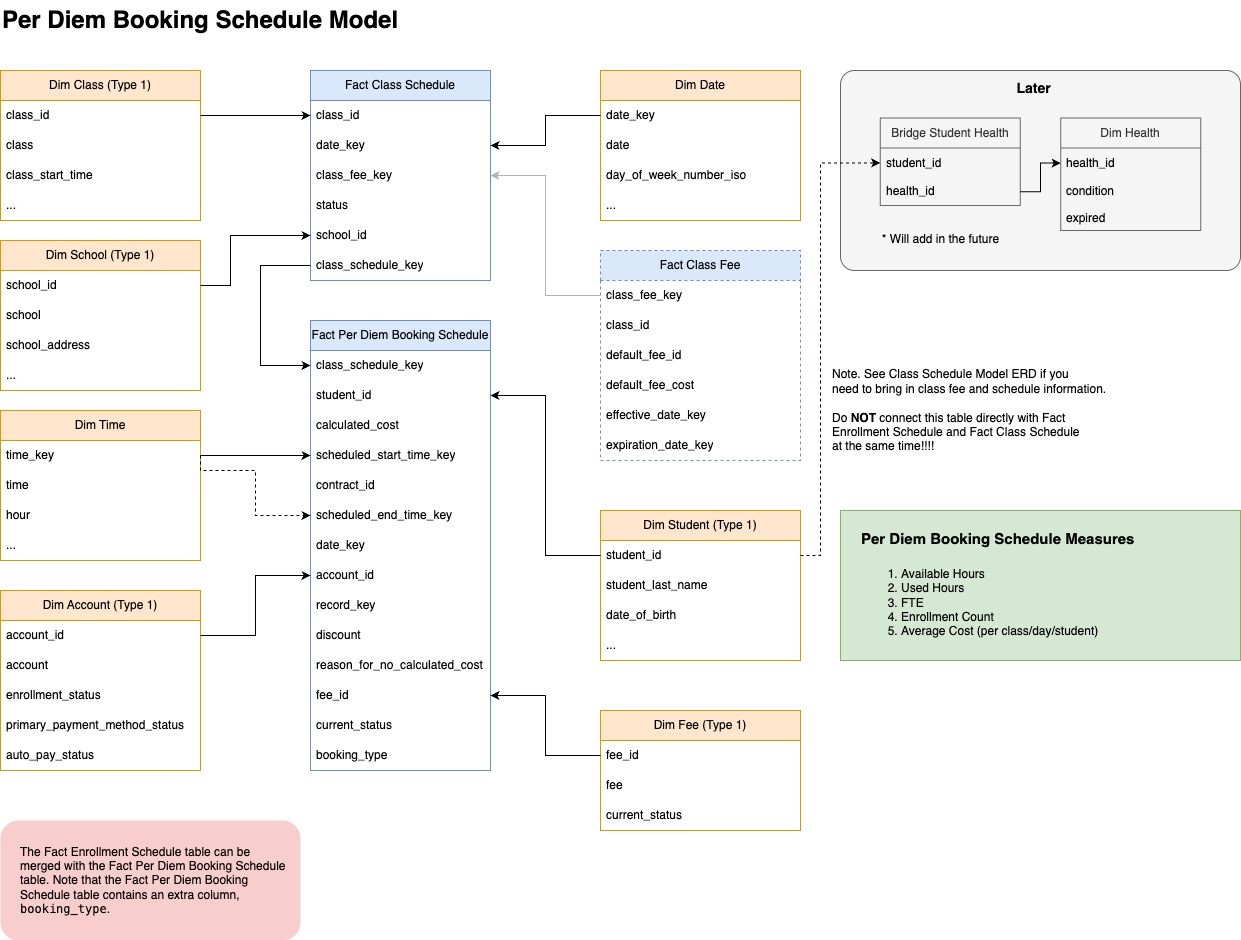
fct_class_fee
This fact table records the default fee rate for a class (when a default permanent fee is set up), including the dates when the fee rate becomes effective and expires. The grain of the data is at the level of the class default permanent fee schedule. This fact table, coupled with accompanying dimension tables, can help users to understand questions such as: What classes are open/closed on specified days? What is the maximum revenue for a class on specified days?
fct_class_schedule
This fact table records the dates on which a class is available, starting from its start date and ending either on its end date or, for classes without an end date, five years from the current date. The granularity of the data is daily, representing each date a class is operational. This fact table, coupled with accompanying dimension tables, can help users to understand questions such as: What classes are open/closed on specified days? What is the maximum revenue for a class on specified days?
fct_employee_shift_non_conformed
Employee shift information
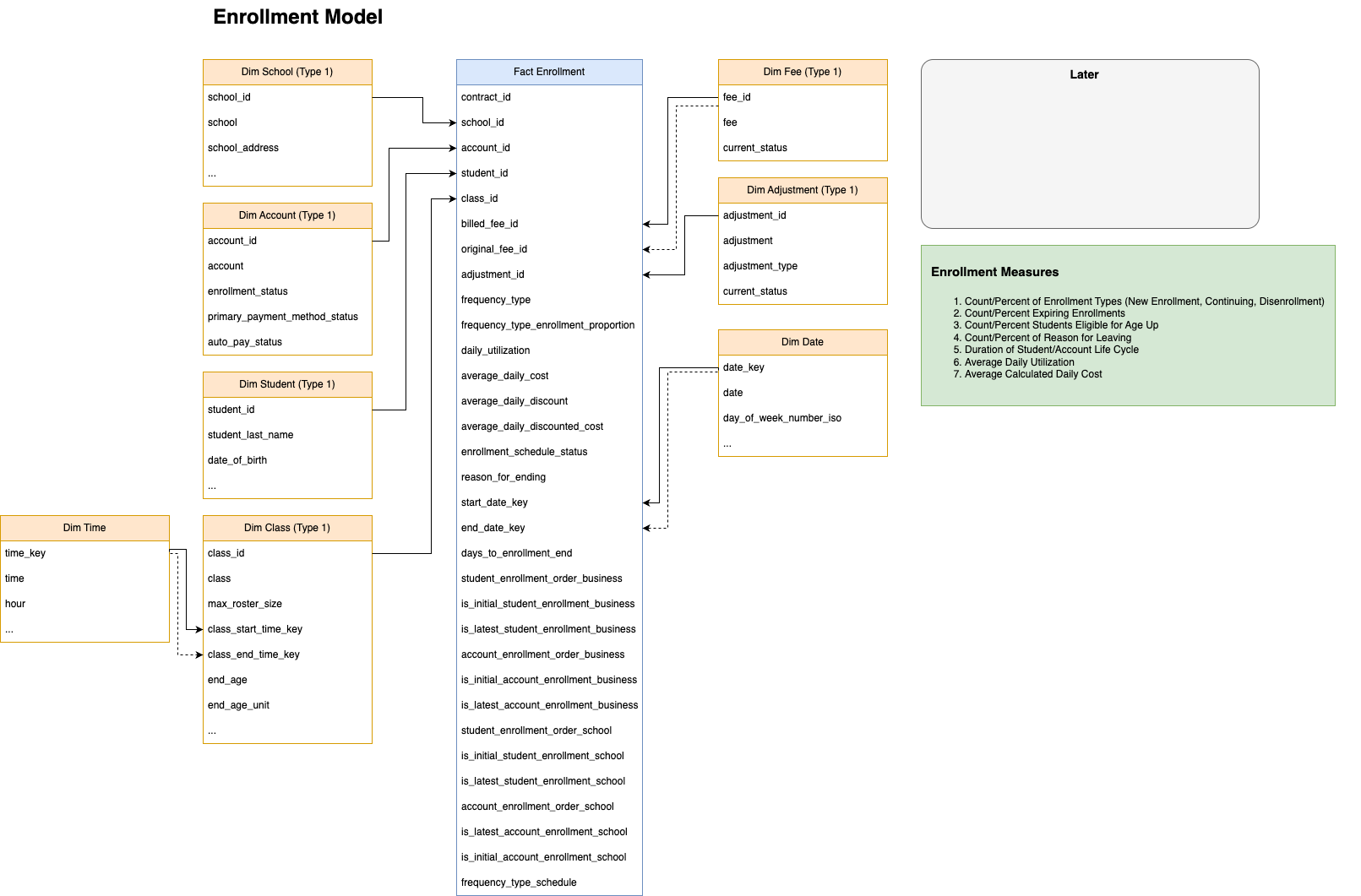
fct_enrollment
This fact table provides information pertaining to the enrollment schedule. Specifically, it contains fields for the timing & ordering (e.g., start and end dates), usage, and fees for child enrollments. The grain of this fact table is at the enrollment schedule level (class + child + cycle type + time slots grouping). An enrollment is an instance of a student on a roster for a organizational unit (business, school, or class) for a period of time. The roster is the list of the students that are the currently enrolled within an organizational unit during a time. The student may have multiple schedules for the same organizational unit within a time period but only one enrollment. This fact table, coupled with accompanying dimension tables, can help users to understand questions such as: What is the account's/child's enrollment history? What students are eligible to age up? How many new enrollments, disenrollments, continuing enrollments are there for the organizational unit for a period of time? What enrollments are expiring soon? (follow up questions to this question: Is there a new enrollment set up? If No then Why?)
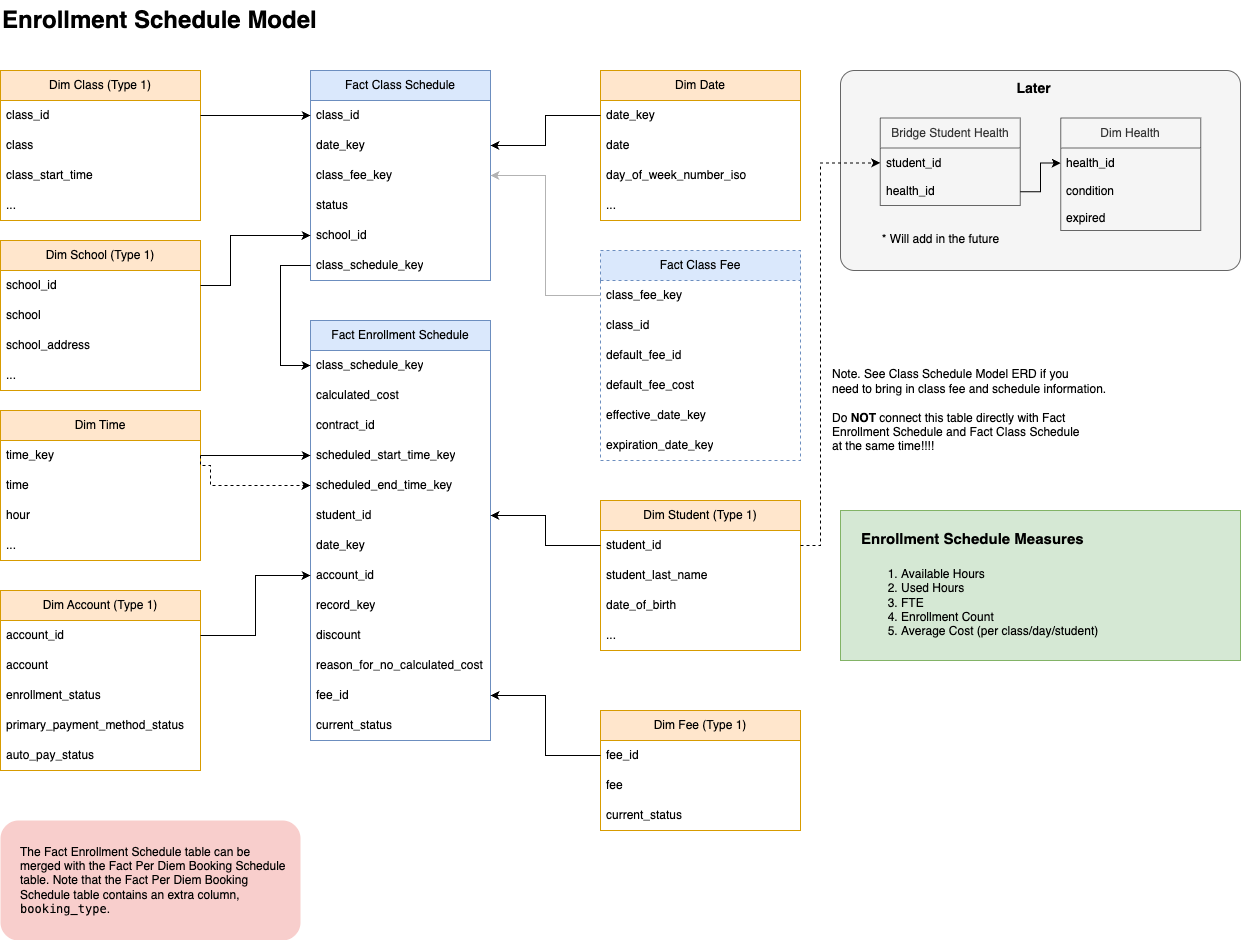
fct_enrollment_schedule
This fact table provides the dates and times when an enrollment was scheduled to take place or will take place (up to 1 year into the future). The grain of the data is the date at which a child is scheduled to be in a class. This fact table, coupled with accompanying dimension tables, can help users to understand questions such as: For any time period, what is the enrolled student count for each class, school, or business? For any time period, what is the utilization rate for each class, school, or business? When are the underutilized days and times for each class, school, or business? What is the full-time equivalent (FTE) enrollment for each class, school, or business? What is the enrollment trend over time for each class, school, or business?
fct_per_diem_booking_schedule
This fact table provides the dates and times when an enrollment was scheduled to take place or will take place (up to 1 year into the future). Unlike the Enrollment Schedule table, this fact table contains enrolled days manually scheduled by staff (ad hoc) or parents (drop-in). The grain of the data is the date at which a child is scheduled to be in a class. The grain of the data is the date at which a child is scheduled to be in a class. This fact table, coupled with the Enrollment Schedule table and accompanying dimension tables, can help users to understand questions such as: For any time period, what is the enrolled student count for each class, school, or business? For any time period, what is the utilization rate for each class, school, or business? When are the underutilized days and times for each class, school, or business? What is the full-time equivalent (FTE) enrollment for each class, school, or business? What is the enrollment trend over time for each class, school, or business?
fct_program_experience_survey
This fact table records satisfaction of the program at a given datetime.
fct_prospective_enrollment
This fact table enables counting prospective enrollment opportunities (application_schedule_id), applications (application_id), and unique students (student_key). When this table is paired with fct_prospective_enrollment_stage it allows these same counts at that have completed various stages. Note the grain of this fact table can vary. The most common and detailed grain is at at the application schedule level (prospective enrollment) consisting of application + student + school + class. However, for application flows that allow application without assigning students to classes, the grain can be at a higher level consisting of application + student + school. This fact table, coupled with accompanying child fact table & dimension tables, can help users to understand questions such as: How many prospective enrollment opportunities are in various stages across time? How much in registration fees have been collected? it enables counting the various stages historically (stages may include 'Early Registration', 'In Progress', 'Applied', 'Approval Pending', 'Waitlisted', 'Completed', and 'Lost').
fct_prospective_enrollment_payment
This fact table provides the fee charge, credit & collected amounts for registrations as well as the ability. The grain of this fact table is at at the payment(s) within the prospective enrollment (consisting of application + student + school + class). This fact table, coupled with accompanying child fact table & dimension tables, can help users to understand questions such as: How much in registration fees have been collected?
fct_session_subsidy_non_conformed
Session subsidies information. Provides all the subsidy agencies associated with a session. Use session_extended_id to connect to the fct_business_session_time_entry table.
fct_session_time_entry_non_conformed
Session & attendance information. The data grain is a time entry (check-in and/or check-out time) for a single session. Note that a session can have multiple time entries (i.e., a child was checked in and out more than once for a session)
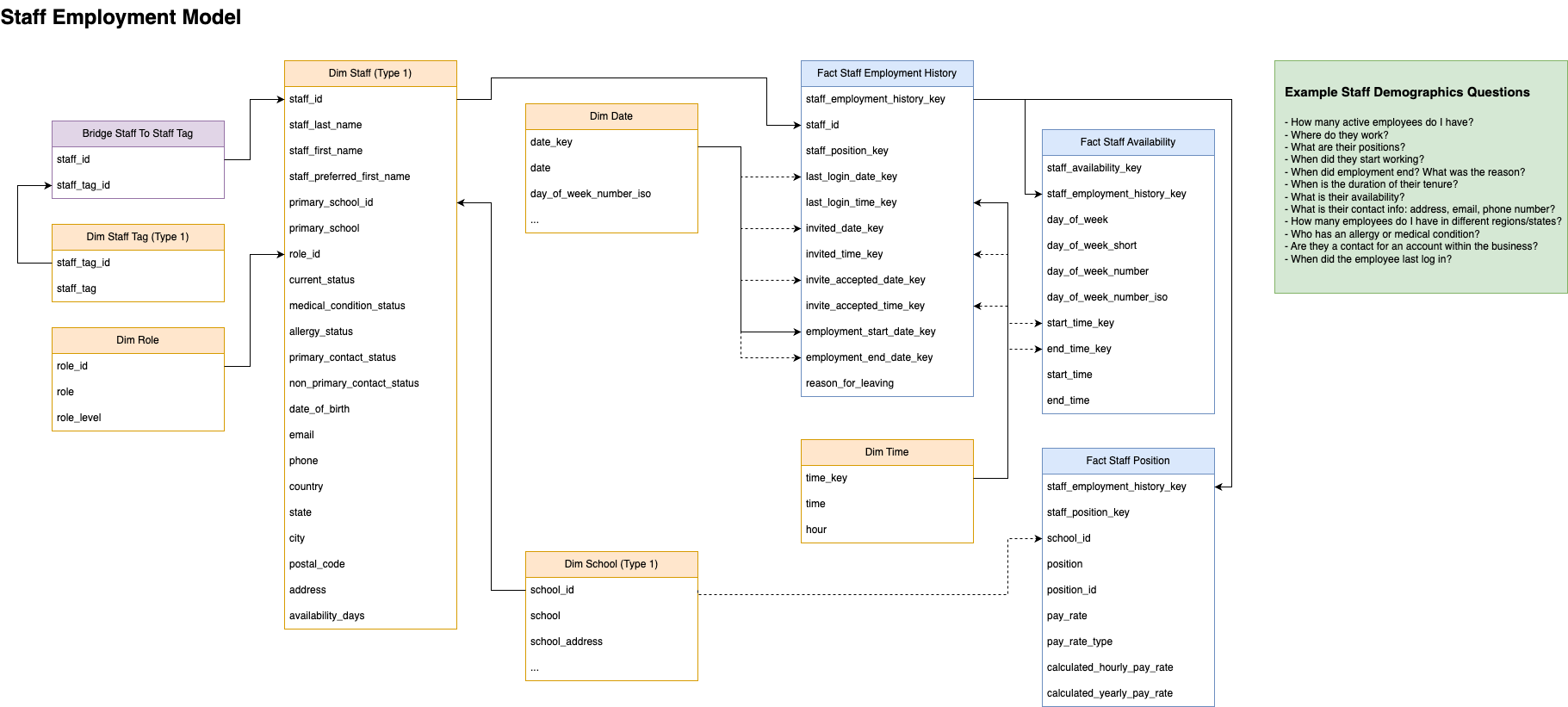
fct_staff_availability
Staff availability information. The data grain is day of week for each staff within a business.
fct_staff_employment_history
Staff emplyment history information. The data grain is staff level within a business.
fct_staff_position
Staff position information. The data grain is day of week for the each staff within a schools. A staff may have multiple positions.
fct_transaction
This fact table provides the amounts for records (derived from transactions) with a wide assortment of date types (Cash Basis, Revenue Recognized, Locked, Period, Created, Applied, Bill Invoice and Payment Due) as well as the time when the derived transaction was created. The grain of this fact table is at the transaction level for all date types except revenue recognition, which have been distributed across the session days when the service would be rendered. To make this distinction we refer to each row as a record, which is either an original transaction or a flat rat distribution derived from the original transaction (note that where the amount does not distribute equally across days, the remainder will be added to the final day's transaction). A value of -1 for any date key indicates that this record is not applicable to this date type. For example, if a record has not yet been billed then no Bill Invoice date is available. This fact table, coupled with accompanying dimension tables, can help users to understand questions such as: What financial activity happened and when BY account, GL code (for accounting software such as NetSuite, SAGE, & QuickBooks), transaction type (discount, subsidy, payments, credits, deposits, charges [tuition and non-tuition], etc.)? What are the details of the transaction (e.g., charge name, payment type, credit description, transaction type, etc.)? Who owes money and how old is that debt? What payments failed (When?; The method?; How much?; Was auto pay set?; Were there payments after the failure?)?